
Resetting the balance of an accumulating compensation plan
What is the compensation balance reset feature?
Many companies require periodic balance resets (for example, at the end of the financial year or half-year) to manage their budgets and mitigate tax risks.
This feature allows companies to automatically reset their employees' unused compensation balances to zero before a new compensation amount is reloaded. It is a great way to clear any accumulated balance right before the new year to avoid exceeding the tax-free limit.
Resetting balances prevents the over-accumulation of unused Stebby credit while ensuring predictable costs for the company. The reset applies to all users (employees) who are assigned to the plan at the exact moment the reset is executed.
Setting up the balance reset ⚙️:
How do I enable the balance reset on an accumulating compensation plan?
When creating or editing an accumulating plan, simply follow these steps:
- Navigate to the "Compensations" tab.
- Select the plan you wish to modify from your list of compensation plans and click "Change plan".
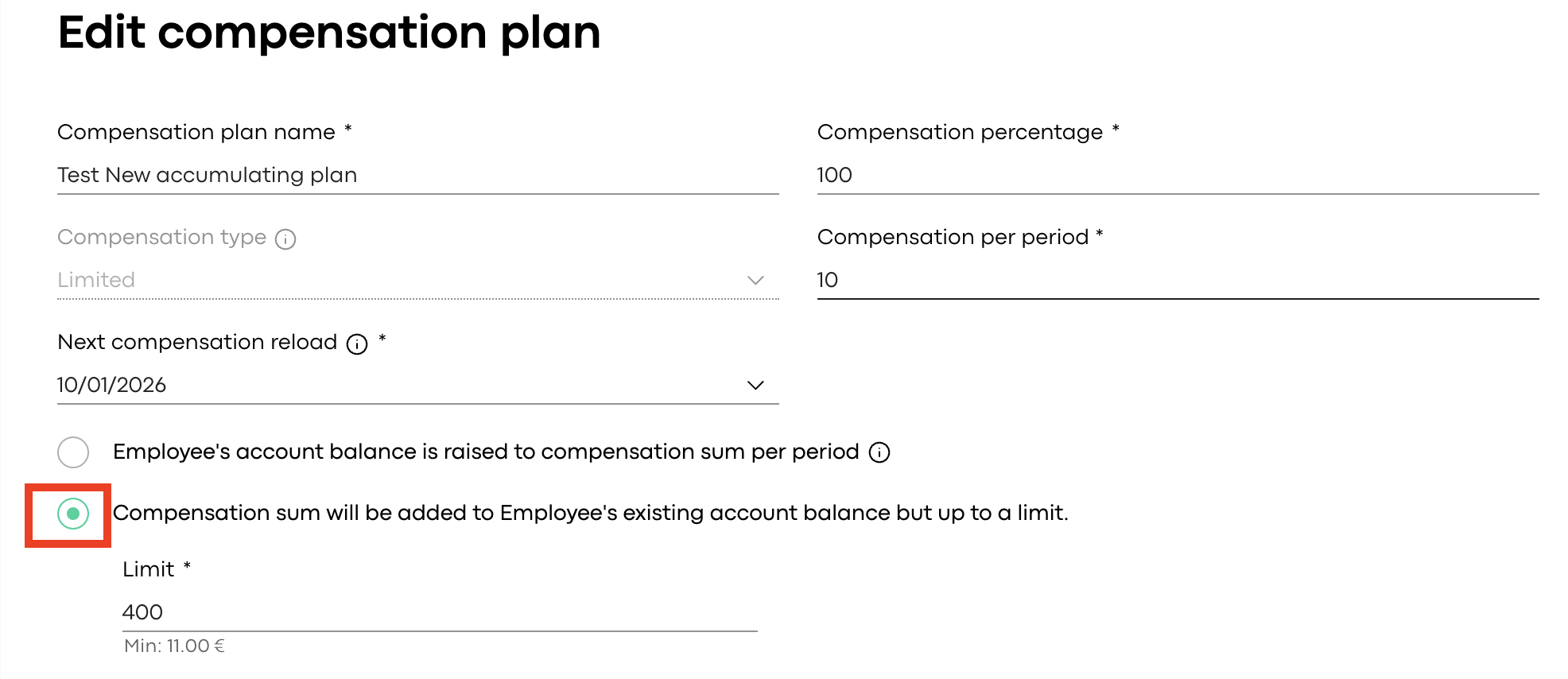
- Choose "Compensation sum will be added to Employee's existing account balance but up to a limit." and set your desired limit amount.
-
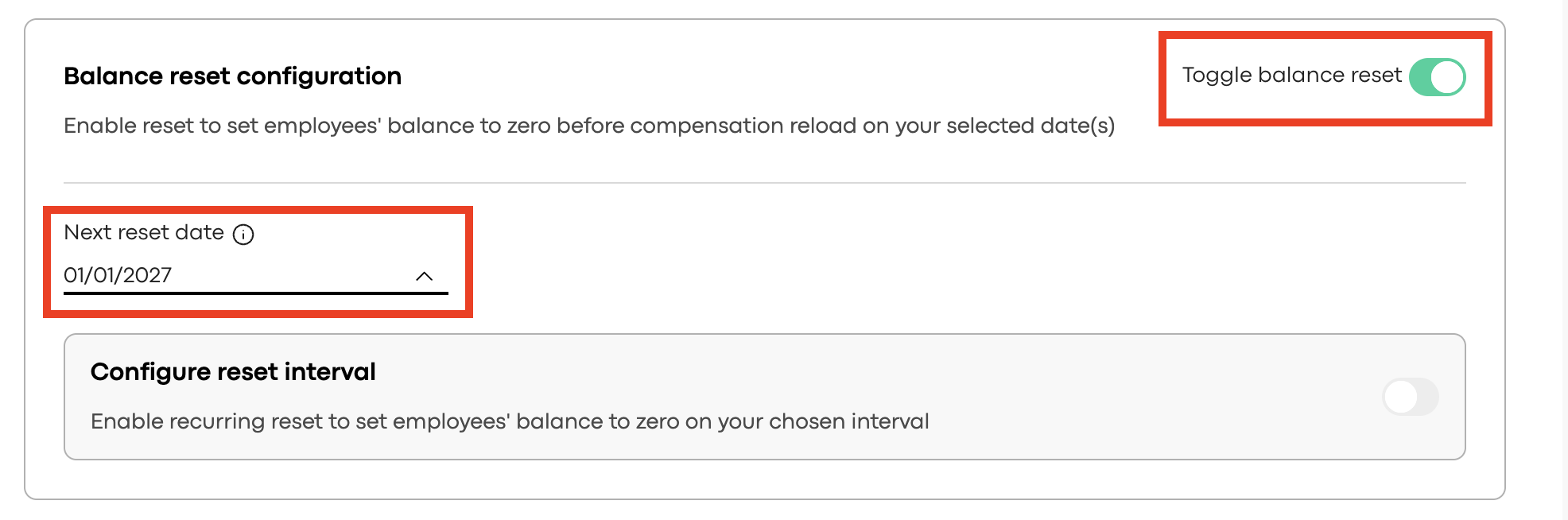
- Next, toggle on the "Toggle balance reset" and select a date option from "Next reset date" (by default, this automatically matches your next compensation reload date).
-
- Scroll down to the bottom of the page and click "Save" ✅.
How do recurring resets work?
If you would like the balance to reset to happen automatically on a regular basis:
- Enable "Configure reset interval", select how often you want it to repeat (available intervals are every 2, 3, 4, 6, or 12 reload periods), and click "Save" at the end of the page.
-
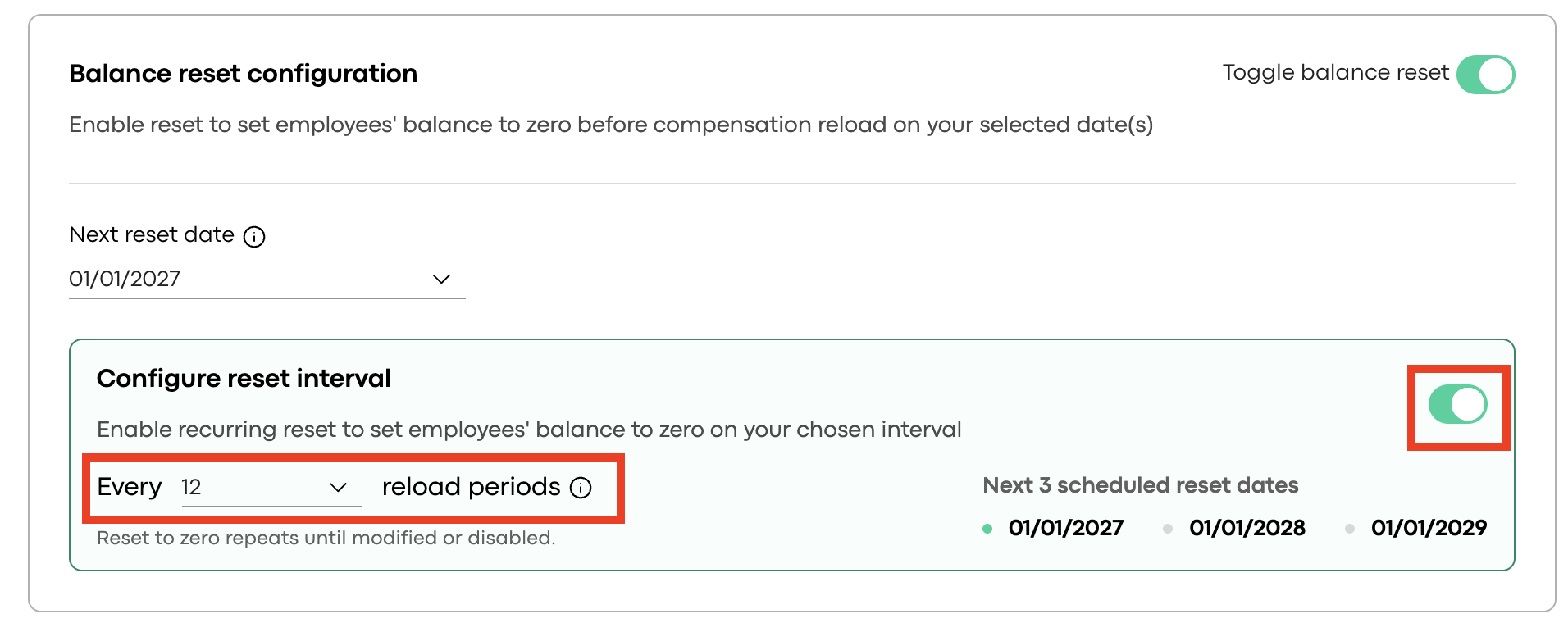
💡 Pro tip: If your company uses a monthly reload plan and you select an interval of 6, balances will be automatically reset every 6 months. To make things easy, the system will always display the next three scheduled reset dates for you to verify!
Rules and modifying plans ⚠️:
- Can I schedule the reset for any date?
No, every reset date must strictly align with a valid, scheduled future reload date (and must be at least 1 day in the future). Resets are always executed immediately before the new funds are loaded.
- What happens if I turn off the balance reset?
Disabling the reset feature will immediately cancel all previously scheduled resets for that specific plan.
- What happens if I change an accumulating plan to a non-accumulating one?
If you change the plan type, all reset settings will automatically be disabled. If you decide to change the plan back to an accumulating one later, you will need to set up the reset rules from scratch.
- How do employees see the balance reset on their Stebby account?
In the employee’s transaction history, the reset and the subsequent new compensation reload will appear as two separate entries:
🔴 Reset: A negative transaction / "Funds removed". (Note: If the balance was already €0, no reset entry will be created).
🟢 Reload: A positive transaction / "Funds added".
- Are employees notified before their funds expire? Yes! 📩 Employees will receive an automated email regarding the upcoming balance reset (similar to the standard expiring compensation notification).
- The notification includes the reset date and the exact amount at risk.
- These notifications are only sent if the amount to be reset is at least €1.00. This serves as a friendly reminder for employees to use their remaining wellness funds just in time!
If you have any additional questions or need a hand with the setup, our Customer Support team is more than happy to help! Reach out to us, and let’s make managing your company's wellness simple together.